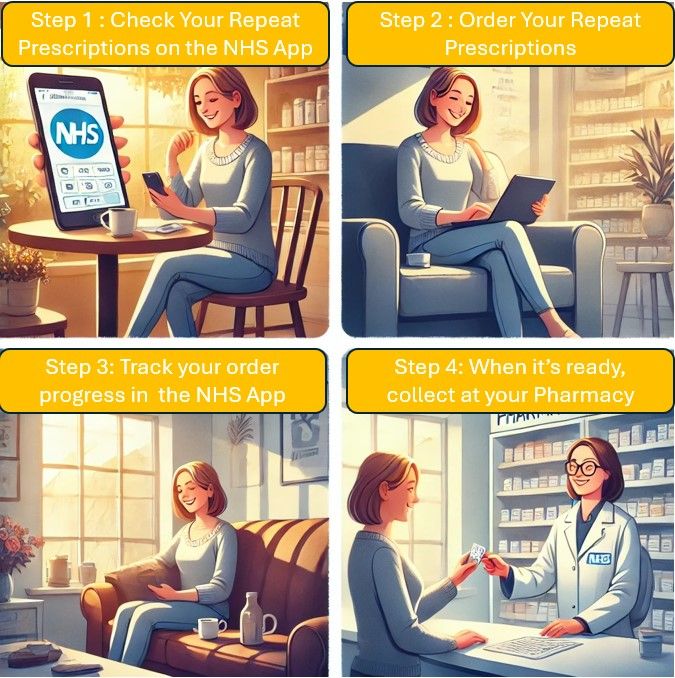
If you take a medicine regularly, you can usually order more in the NHS App without phoning your GP surgery. Select Prescriptions, then Request a repeat prescription, and tick what you need. Order up to 5 working days before you run out, because the GP and pharmacy both need time.
If you have already run out and cannot wait, do not use the app. See getting an emergency prescription instead.
You would be in good company. NHS England says more than 39 million people are registered for the NHS App, and 6.3 million repeat prescriptions were ordered through it in November 2025 alone.
Before you start
You need to have set up the NHS App and proved who you are. If you have not done this yet, start with getting started with the NHS App. You can do the same things by logging in on the NHS website from a computer.
It also helps to choose a pharmacy first (see below), so your prescription goes straight there.
How to order a repeat prescription
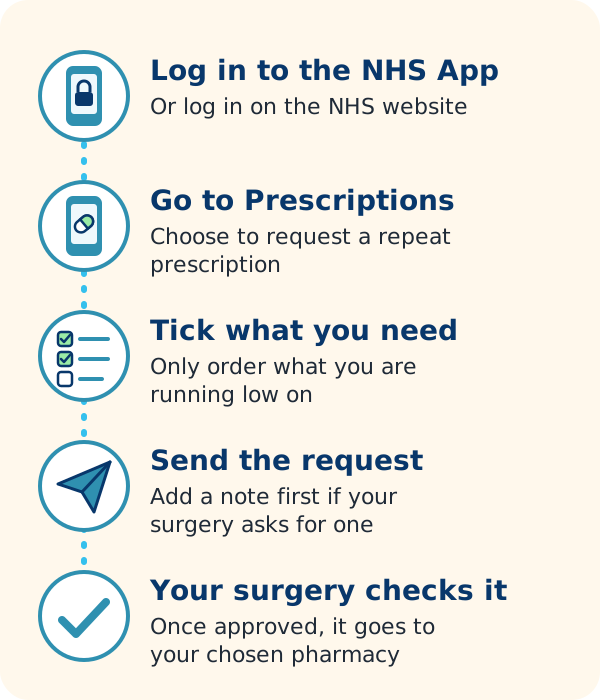
- Open the NHS App and log in.
- Select Prescriptions.
- Select Request a repeat prescription.
- Check your chosen pharmacy is right, or choose one if you have not done this before. Select Continue.
- Tick the medicines you need, then select Continue. Only order what you are running low on.
- Add a note if you want to (some surgeries ask for one), select Continue, then Request prescription.
Your GP surgery checks and approves the request. Once approved, it goes automatically to your chosen pharmacy.
Watch the NHS’s short video of the steps (signed in British Sign Language):
 Play video: How to request a repeat prescription, from NHS
How to request a repeat prescription
Tracking your request
To see where your request is, select Prescriptions, then Check the progress of prescriptions. First you will see one of these:
- Waiting GP approval: the surgery has not dealt with it yet.
- Approved by GP: it has been sent to the pharmacy.
- Rejected by GP: contact your surgery to ask why. You may need a medicine review.
Some people can also see what the pharmacy is doing. This tracking is still being rolled out, so you may not have it yet. Statuses include “Pharmacy preparing prescription”, “Part ready to collect” (often because something is out of stock), “Ready to collect” or “Ready for delivery”, and “Collected” or “Dispatched by pharmacy”.
If a prescription shows as Cancelled, ask your GP surgery why. If it says Cancelled by pharmacy, ask the pharmacy.
Approved prescriptions and their barcodes are under Your approved prescriptions on the home screen.
How long it takes
- Order up to 5 working days before you need your medicine.
- With a chosen pharmacy, prescriptions are usually ready in 3 to 5 days after approval.
- Online-only pharmacies post your medicine, so allow extra time. Each sets its own timings: for example, one asks you to order 7 working days ahead, and another says to allow up to 7 working days for delivery. Check the pharmacy’s own website.
- Each prescription holds up to 4 medicines. If you order more, they may be split into separate prescriptions, each with its own barcode.
Take photo ID when you collect. Some pharmacies check it for certain medicines.
Choosing or changing your pharmacy
Your chosen pharmacy (sometimes called your nominated pharmacy) receives your prescriptions electronically until you change it. You have three options:
| Option | How it works |
|---|---|
| A local pharmacy | You collect in person. Some local pharmacies deliver. |
| An online-only pharmacy | Medicines come by post. You sign up through the pharmacy’s own website or app, not in the NHS App. |
| No chosen pharmacy | Show the barcode in the NHS App at any pharmacy. You may wait longer while they order stock. |
To choose a pharmacy: select Prescriptions, then Choose a pharmacy, and follow the steps.
To change it: select Prescriptions, then Your chosen pharmacy, then Change your chosen pharmacy.
Prescriptions you have already ordered may still go to your old pharmacy. You cannot remove a chosen pharmacy in the app; ask your GP surgery to do it.
You may not be able to change your pharmacy in the app if your GP surgery dispenses your medicines itself, if you have more than one chosen pharmacy, or if you are using the app for someone else.
It is your choice
No one should change your chosen pharmacy without your permission. Pharmacies and GP surgeries can change it for you, but only with your clear agreement. They must not pressure you, or offer you a reward, to choose a particular pharmacy. You can change or remove your choice at any time. If your prescriptions start going somewhere you did not choose, tell your GP surgery.
If a medicine is not listed
Some medicines do not appear in the list. This can be because it is:
- a one-off course, not a repeat
- something you have not been prescribed for a long time
- a controlled (strong) medicine, which cannot be ordered in the app
- on repeat dispensing, where the pharmacy supplies it without you ordering each time
- prescribed while you lived outside England
A medicine may also be listed but greyed out. This usually means you ordered it recently, a request is already waiting, your surgery does not allow it to be ordered online, or you need a medicine review first.
In any of these cases, contact your GP surgery. If you see a medicine you do not expect, tell your surgery too.
Local pharmacy or online pharmacy?
None of these is better for everyone. Think about what suits you.
A local pharmacy may suit you if:
- you like face-to-face advice, and you can ask to talk in private
- your medicines or health needs are complicated, and a pharmacist who knows you helps
- your medicines are bulky, or no one is in to take parcels
An online pharmacy may suit you if:
- you are tired of repeat trips to check whether your prescription is ready
- getting out is hard, and your medicines fit through the letterbox or can be left with a neighbour
Online pharmacies
Online pharmacies deliver NHS prescriptions by post. You still pay the usual NHS prescription charge, or nothing if you get free prescriptions. To use one, you register on its website or app, and it then becomes your chosen pharmacy. Examples include (in alphabetical order):
- LloydsPharmacy: its online NHS repeat prescription service is run through Pharmacy2U.
- Pharmacy2U (opens in a new tab) (affiliate link)
- Well
Services differ, so compare them. Extras some online pharmacies offer include:
- Reminders when it is time to reorder, by email, text or app notification
- Order updates, so you can see where your order is and track the delivery
- Private online consultations for some health problems, which you pay for
- Medicines sorted into pouches by dose, which can help if you take several medicines. Not every medicine can be packed this way. For other ways to stay on track, see pill organisers and reminders.
Online-only pharmacies cannot give the Pharmacy First earache consultation, and you cannot pop in to talk to the pharmacist face to face.
Other ways to order
You do not have to use the NHS App. Other options are:
- Your GP surgery’s own system. Many surgeries take requests through their website or an online form. Ask how they prefer to receive them.
- Another GP online services app. Your surgery may use a different app that also uses NHS login. It does the same job.
- A pharmacy’s ordering service. Some high-street and online-only pharmacies will order repeats from your GP for you. You give them your name, age and GP surgery address.
- In person or by phone. Ask your surgery or pharmacy what they accept.
If you help someone else with their medicines, you can order for them through family and carer access. For what prescriptions cost, see prescription costs.
When to get help
- Call 999 if someone has signs of a life-threatening illness, whatever medicines they take.
- Use NHS 111 online or call 111 if you have completely run out of a regular medicine and cannot wait for your repeat. 111 can arrange an emergency supply through a pharmacy.
- Contact your GP surgery if a request is rejected, a medicine is missing, or you are due a review.
- Ask a pharmacist if you are unsure how to take a medicine, have side effects, or have missed doses. Some pharmacies can also supply certain medicines in an emergency, though you may have to pay.